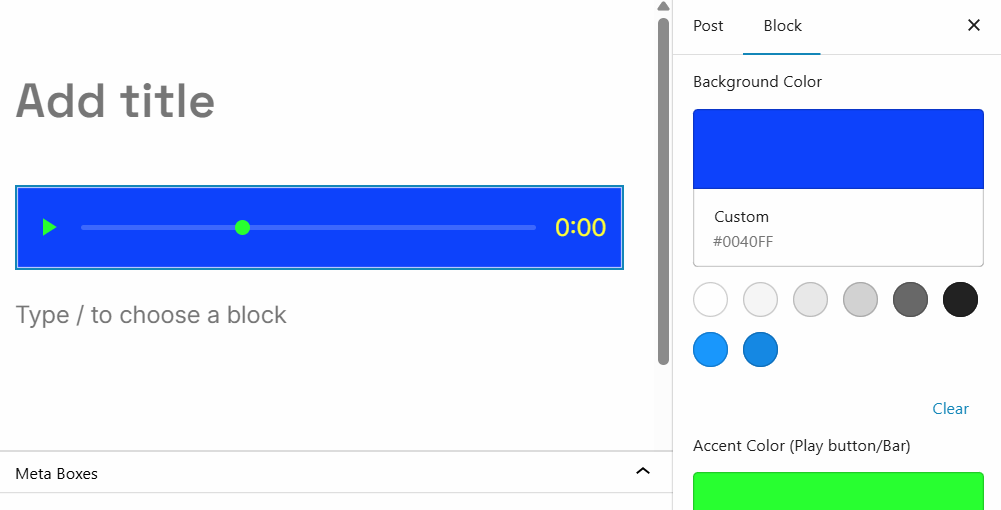
Custom Audio Player Block is a WordPress plugin I made to solve the problem of the Gutenberg default audio block’s lack of styling customization options and across-device uniformity.
By default, mobile devices and web browsers (especially iPhones and iOS Safari) force their own hardcoded layout designs on native <audio> elements. This makes it impossible to achieve a cohesive, cross-device looks of the default audio player block that uses the <audio> element.
The plugin bypasses those restrictions by building an independent, custom-drawn interface powered by PHP and lightweight JavaScript.
Custom Audio Player Block Features
- Cross-Device Consistency: Your audio player will look and behave exactly the same way on iPhones, Android devices, tablets, and desktop browsers.
- Native Gutenberg Integration: Adds a dedicated “Custom Device Audio” block directly inside your WordPress block list.
- Full Design Customization: Features a live-preview sidebar panel allowing site editors to easily adjust:
- Background Color
- Accent Color (Play/Pause button & playback timeline marker)
- Text & Counter Color
- Container Internal Padding (0px to 50px)
- Container Border Radius (create anything from perfectly square to fully pill-shaped players)
Download and Install Plugin
- To get the Custom Audio Player Block plugin, first click here to download it:
- Then upload and install it:
- Upload to WordPress:
- Log in to your WordPress Dashboard.
- Go to Plugins > Add New.
- Click the Upload Plugin button at the top.
- Select your .zip file and click Install Now.
- Activate:
- Click Activate Plugin.
How to Use It
Simply open any post or page, insert the Custom Device Audio block, select or upload your audio file from your Media Library, and style it using the sidebar blocks editor.

Leave a Reply